RestAPI_Setup&Functionality
DGT Rest API - Client Integration Guide
Version: 1.0 Last Updated: December 2025
Table of Contents
- Creating a Rest API Configuration
- Quick Start
- Authentication
- API Workflow
- Action Item APIs
- Error Handling
Creating a Rest API Configuration
Meru Data's Rest API allows clients to perform actions programmatically using secure endpoints. This section explains how to create a Rest API configuration in Meru Data's application and the steps to consume the APIs.
Note: The following reference images are from the staging environment. Production URLs for the core application UI and Rest API will be provided separately. Both environments use key-value pairs such as Lead and Contact IDs.
Steps to Create a Configuration
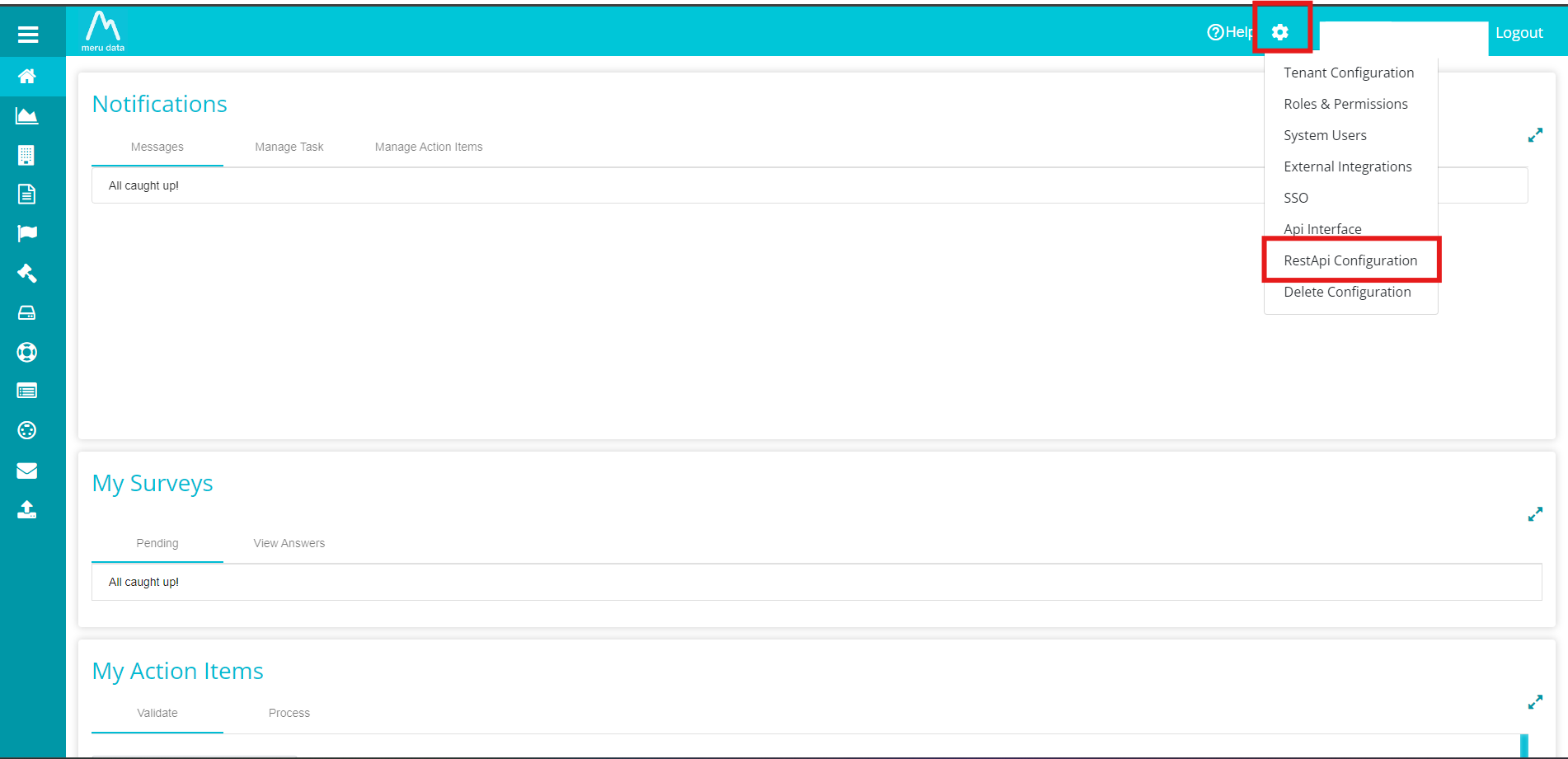
1. Login and Navigate to Rest API Configuration
Login to Meru Data's application and go to Rest API Configuration from the Settings menu.
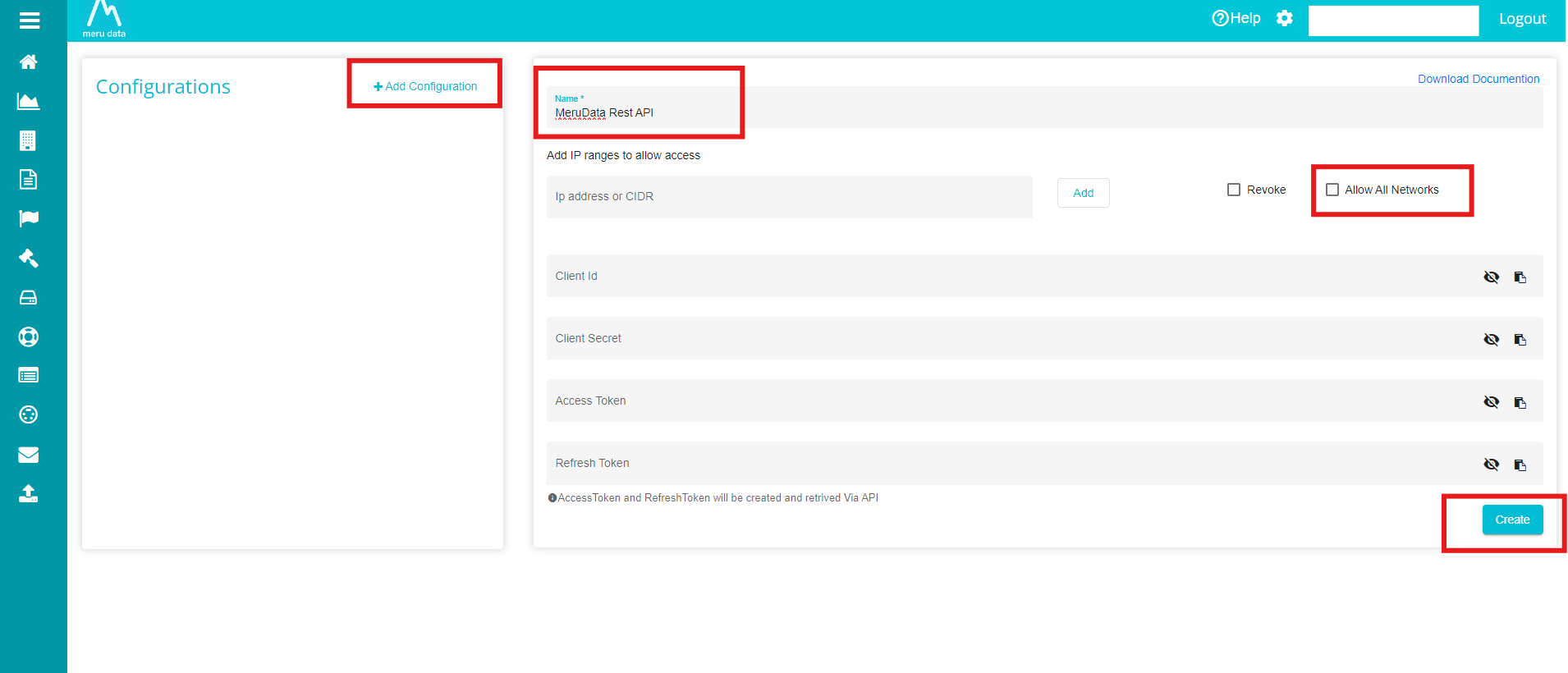
2. Add a New Configuration
Click on the Add Configuration button, enter a unique name, and click Create.
3. Copy Client ID and Client Secret
After creating the configuration, copy the Client ID and Client Secret. These credentials are required to fetch the Access Token, which must be used with every API request to fetch data or perform actions.
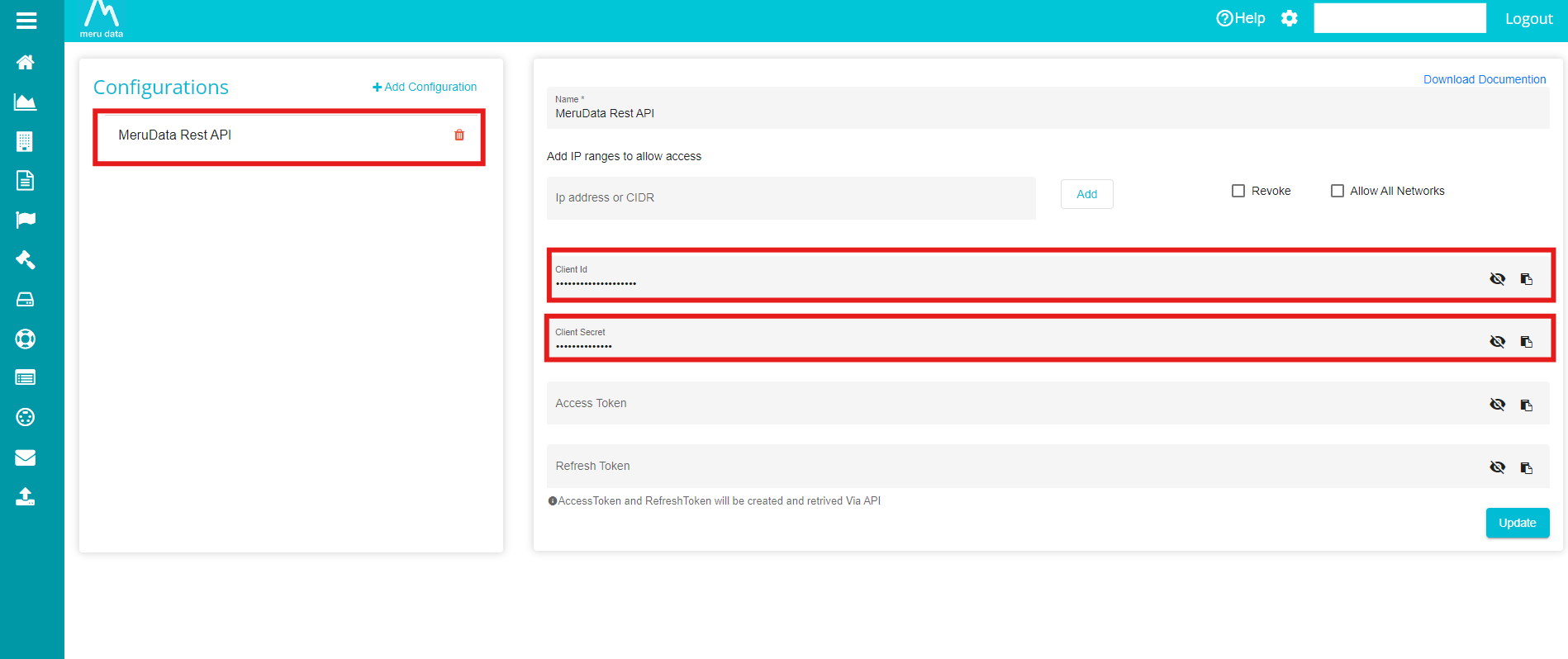
Step 3: Copy Credentials
Additional Notes
- Name is the only required field.
- Enable Allow all networks if you want the Rest API to be accessible from any IP address.
- Other details will be auto-generated by the system.
Quick Start
Prerequisites
- DGT Rest API credentials (Client ID and Client Secret).
- Base URL for your DGT Rest API deployment.
High-Level Flow
1. Authenticate & Get Token
2. Get Pending Validation Items → Submit Validation Responses
3. Get Pending Process Items → Submit Process Responses → Mark Complete
Authentication
Step 1: Get Access Token
Endpoint: POST /api/Auth/RequestAccessToken
Headers:
ClientId: <your_client_id>
ClientSecret: <your_client_secret>
Content-Type: application/json
Request:
{
  "Scope": ["RequestDetails"]
}
Response:
{
  "AccessToken": "eyJhbGciOiJIUzI1NiIsInR5cCI6IkpXVCJ9...",
  "RefreshToken": "refresh_token_here",
  "ExpiresIn": 3600
}
Store both tokens.
Step 2: Handle Token Expiration (401 Response)
When any endpoint returns 401 Unauthorized, refresh immediately:
Endpoint: GET /api/Auth/Refresh
Headers:
RefreshToken: <your_refresh_token>
Response:
{
  "AccessToken": "new_token_here",
  "RefreshToken": "new_refresh_token_here",
  "ExpiresIn": 3600
}
Then retry your original request with the new AccessToken.
API Workflow
Data Subject Request (DSR) Lifecycle
VALIDATION PHASE
├─ Get Pending Validation Items
├─ Verify if customer data exists in your systems
└─ Submit Validation Response

         ↓ System automatically transitions

PROCESS PHASE
├─ Get Pending Process Items
├─ Execute requested action (delete/export/correct)
└─ Submit Process Response

         ↓ Finalize

COMPLETION PHASE
└─ Mark Action Items as Complete
Action Item APIs
All endpoints require:
AccessToken: <your_access_token>
1. Get DSAR Form Fields
Endpoint: GET /DSR/ActionItem/GetDSARFormFields
Description: Retrieves the list of available DSR form fields that can be used in validation and process requests.
Headers:
AccessToken: <token>
Query Parameters: None
Response:
[
  {
    "FieldId": 1,
    "FieldName": "Email"
  },
  {
    "FieldId": 2,
    "FieldName": "Phone"
  },
  {
    "FieldId": 3,
    "FieldName": "Name"
  }
]
2. Get Pending Validation Items
Endpoint: GET /DSR/ActionItem/PendingActionItems?actionItemType=1
Query Parameters:
Parameter Type Default Purpose
actionItemType int 1 1 = validation, 2
= process
Response:
[
  {
    "ActionItemId": 4241,
    "RequestId": 1196,
    "ActionItemType": 1,
    "SystemName": "CRM System",
    "Status": "Pending",
    "CreatedDate": "2024-01-15T10:30:00Z",
    "DueDate": "2024-01-20T10:30:00Z",
    "Description": "Validate customer identity for john.doe@example.com"
  }
]
3. Get Pending Validation Items (V2 - Tenant-based)
Endpoint: GET /DSR/ActionItem/{tenant}/PendingValidateItems
Description: Alternative endpoint for retrieving pending validation items filtered by tenant and additional criteria. Use this for tenant-specific queries.
Headers:
AccessToken: <token>
Path Parameters:
Parameter Type Required Description
tenant string Yes Tenant identifier
Query Parameters:
Parameter Type Required Description
domain string No Filter by domain. This value must be the
identifier listed under the Domain tab
in the DSR module.
act string No Filter by action type. This value must
be the identifier listed under the act
tab in the DSR module.
requestor string No Filter by requestor. This value must be
the identifier listed under the
requestor tab in the DSR module.
requestType string No Filter by request type (e.g., Access,
Delete, Correct) This value must be the
identifier listed under the Request Type
tab in the DSR module.
requestId string No Filter by specific request ID
Example Request:
GET /DSR/ActionItem/acme-corp/PendingValidateItems?domain=domain1&requestType=Access
Response:
{
  "statusCode": 200,
  "errorMessage": "",
  "response": {
    "ActionItems": [
      {
        "ActionItemId": 4241,
        "RequestId": 1196,
        "Status": "Pending",
        "Description": "Validate customer identity",
        "CreatedDate": "2024-01-15T10:30:00Z"
      }
    ],
    "TotalCount": 1
  }
}
4. Submit Validation Response
Endpoint: POST /DSR/ActionItem/ValidateActionItemResponse
Headers:
AccessToken: <token>
Content-Type: multipart/form-data
Form Data: - response (required): JSON string (see below) -
files (optional): PDF, image, or any document files
JSON Request Body:
{
  "RequestId": 1196,
  "ActionItemId": 4241,
  "MatchFound": true,
  "ActionItemKeyResponse": {
    "customerId": "CUST-12345",
    "systemRecordId": "REC-001"
  },
  "DSARFormFields": [
    {
      "FieldId": 10,
      "FieldName": "PhoneNumber"
    }
  ],
  "Comment": "Customer found in CRM. Phone number not on file."
}
Field Descriptions:
Field Type Required Description
RequestId int Yes The DSR Request ID from the pending
action item
ActionItemId int Yes The Action Item ID from the pending
item
MatchFound bool Yes Set to true if matching customer data
was found, false if no match
ActionItemKeyResponse object No Key-value pairs of system identifiers
found (e.g., customerId,
accountNumber). Use {} if no match
found
DSARFormFields array No Array of request fields that could not
be found/matched. Each item must
contain FieldId (int) and FieldName
(string). Use [] if all fields
matched
Comment string No Additional notes about the validation
result
Example - Match Found:
{
  "RequestId": 1196,
  "ActionItemId": 4241,
  "MatchFound": true,
  "ActionItemKeyResponse": {
    "customerId": "CUST-12345",
    "accountId": "ACC-98765"
  },
  "DSARFormFields": [],
  "Comment": "Customer data found in system"
}
Example - No Match Found:
{
  "RequestId": 1197,
  "ActionItemId": 4242,
  "MatchFound": false,
  "ActionItemKeyResponse": {},
  "DSARFormFields": [
    { "FieldId": 1, "FieldName": "Email" },
    { "FieldId": 2, "FieldName": "Phone" }
  ],
  "Comment": "No customer record found matching provided information"
}
cURL Example:
curl -X POST "https://stagerestapi.merudata.app/DSR/ActionItem/ValidateActionItemResponse"
  -H "AccessToken: your_access_token"
  -H "Content-Type: multipart/form-data"
  -F "response={"RequestId":1196,"ActionItemId":4241,"MatchFound":true,"ActionItemKeyResponse":{"customerId":"CUST-12345"},"DSARFormFields":[],"Comment":"Match found"}"
  -F "files=@verification_document.pdf"
Response:
{
  "statusCode": 200,
  "Response": "Action item response submitted successfully"
}
5. Submit Validation Response (V2 - Action Item ID in Path)
Endpoint:
POST /DSR/ActionItem/SubmitValidateResponse/{actionItemId}
Description: Alternative endpoint for submitting validation responses with the action item ID in the URL path. Uses a different request model format.
Headers:
AccessToken: <token>
Content-Type: multipart/form-data
Path Parameters:
Parameter Type Required Description
actionItemId long Yes The Action Item
ID
Form Data: - response (required): JSON string - files
(optional): Attachments
JSON Request Body:
{
  "MatchResponse": true,
  "KeysResponse": {
    "customerId": "CUST-12345",
    "accountId": "ACC-98765"
  },
  "MatchNotFoundFields": [],
  "Comment": "Customer verified in system"
}
Field Descriptions:
Field Type Required Description
MatchResponse bool Yes Whether customer data was found
KeysResponse object No System identifiers if match found. Use
{} if no match
MatchNotFoundFields array No Fields that didn't match. Each item
must contain FieldId and
FieldName. Use [] if all matched
Comment string No Additional notes
cURL Example:
curl -X POST "https://stagerestapi.merudata.app/DSR/ActionItem/SubmitValidateResponse/4241"
  -H "AccessToken: your_access_token"
  -H "Content-Type: multipart/form-data"
  -F "response={"MatchResponse":true,"KeysResponse":{"customerId":"CUST-12345"},"MatchNotFoundFields":[],"Comment":"Match found"}"
  -F "files=@verification_document.pdf"
Response:
{
  "statusCode": 200,
  "errorMessage": "",
  "response": true
}
6. Get Pending Process Items
Endpoint: GET /DSR/ActionItem/PendingProcessActionItems
Query Parameters:
Parameter Type Default
dsrId int 0
systemId int 0
Response:
{
  "statusCode": 200,
  "errorMessage": "",
  "response": [
    {
      "ActionItemId": 5001,
      "RequestId": 1196,
      "ActionItemType": 2,
      "SystemId": 5,
      "SystemName": "CRM System",
      "Status": "Pending",
      "Description": "Delete all customer data for CUST-12345",
      "CreatedDate": "2024-01-20T10:30:00Z",
      "DueDate": "2024-01-25T10:30:00Z"
    }
  ]
}
7. Submit Process Response
Endpoint: POST /DSR/ActionItem/ProcessActionItemResponse
What is this? After you complete the action (delete files, export data, correct records), tell the system what you did.
Headers:
AccessToken: <token>
Content-Type: multipart/form-data
Form Data: - response (required): JSON string - files
(optional): Exported data, deletion certificates, etc.
JSON Request Body:
{
  "RequestId": 1196,
  "ActionItemId": 5001,
  "MatchFound": true,
  "Response": "Deleted 15 customer records from database, 3 records from email list, 2 records from marketing system. All backup copies scheduled for deletion on 2024-03-15.",
  "Comment": "Complete deletion per GDPR request. Verification attached."
}
Field Descriptions:
Field Type Required Description
RequestId int Yes The DSR Request ID from the pending action
item
ActionItemId int Yes The Process Action Item ID from the pending
item
MatchFound bool Yes Set to true if data was found and action
was performed, false if no matching data
exists
Response string Yes Detailed description of what was processed.
Include counts and specifics (e.g.,
"Deleted 15 customer records, 3 order
records, 2 email entries")
Comment string No Additional context or notes about the
action taken
Examples:
Deletion:
{
  "RequestId": 1196,
  "ActionItemId": 5001,
  "MatchFound": true,
  "Response": "Successfully deleted: 15 customer profiles, 42 order records, 128 email logs from all systems",
  "Comment": "All backup retention set to 30 days per policy"
}
Export:
{
  "RequestId": 1197,
  "ActionItemId": 5002,
  "MatchFound": true,
  "Response": "Exported customer profile, 23 orders, 45 support tickets, 12 payment records in JSON format",
  "Comment": "Files attached - encrypted per security policy"
}
No Data Found:
{
  "RequestId": 1198,
  "ActionItemId": 5003,
  "MatchFound": false,
  "Response": "No records found matching customer ID. Searched all databases and systems.",
  "Comment": "Already deleted or never existed in system"
}
cURL Example:
curl -X POST "https://stagerestapi.merudata.app/DSR/ActionItem/ProcessActionItemResponse"
  -H "AccessToken: your_access_token"
  -H "Content-Type: multipart/form-data"
  -F "response={"RequestId":1196,"ActionItemId":5001,"MatchFound":true,"Response":"Deleted 15 customer records, 8 order records","Comment":"Complete deletion executed"}"
  -F "files=@deletion_confirmation.pdf"
Response:
{
  "statusCode": 200,
  "Response": "Process action item response submitted successfully"
}
8. Mark Action Items Complete
Endpoint: PUT /DSR/ActionItem/CompleteProcessActionItems
Description: Marks one or more process action items as completed and finalized in the system. This must be called after submitting process responses to properly close out the action items.
Headers:
AccessToken: <token>
Content-Type: application/json
Request Body:
[5001, 5002, 5003]
A JSON array containing the action item IDs to mark as complete.
Response:
true
cURL Example:
curl -X PUT "https://stagerestapi.merudata.app/DSR/ActionItem/CompleteProcessActionItems"
  -H "AccessToken: your_access_token"
  -H "Content-Type: application/json"
  -d "[5001, 5002, 5003]"
09. Bulk Submit Validation Responses
Endpoint: POST /DSR/ActionItem/BulkValidateActionItemResponses
Description: Submit multiple validation action item responses in a single request. This is useful for processing multiple pending validation items efficiently.
Headers:
AccessToken: <token>
Content-Type: multipart/form-data
Form Data: - responses (required): JSON string containing an array
of validation responses - files (optional): All files/attachments for
all responses combined
Request JSON Array:
[
  {
    "RequestId": 1196,
    "ActionItemId": 4241,
    "MatchFound": true,
    "ActionItemKeyResponse": {
      "customerId": "CUST-12345"
    },
    "DSARFormFields": [],
    "Comment": "Customer found in system",
    "ActionItemAttachments": ["document1.pdf"]
  },
  {
    "RequestId": 1197,
    "ActionItemId": 4242,
    "MatchFound": false,
    "ActionItemKeyResponse": {},
    "DSARFormFields": [
      { "FieldId": 1, "FieldName": "Email" },
      { "FieldId": 2, "FieldName": "Phone" }
    ],
    "Comment": "No customer record found",
    "ActionItemAttachments": []
  }
]
Field Descriptions:
Field Type Required Description
RequestId int Yes DSR Request ID
ActionItemId int Yes Validation Action Item ID
MatchFound bool Yes Whether customer data was found
ActionItemKeyResponse object No System identifiers if match found.
Use {} if no match
DSARFormFields array No Fields that didn't match. Use []
if all matched or no match
Comment string No Additional notes
ActionItemAttachments array No Filenames of attachments (must match
file names in files parameter).
Use [] if no files
Important Notes: - All files for all action items should be included
in the single files form parameter - Each item's
ActionItemAttachments array should contain the filenames that
correspond to that specific item - File names must match exactly
(case-sensitive) - If a filename in ActionItemAttachments is not found
in the uploaded files, the request will fail
cURL Example:
curl -X POST "https://stagerestapi.merudata.app/DSR/ActionItem/BulkValidateActionItemResponses"
  -H "AccessToken: your_access_token"
  -F "responses=[{"RequestId":1196,"ActionItemId":4241,"MatchFound":true,"ActionItemKeyResponse":{"customerId":"CUST-12345"},"DSARFormFields":[],"Comment":"Found","ActionItemAttachments":["doc1.pdf"]},{"RequestId":1197,"ActionItemId":4242,"MatchFound":false,"ActionItemKeyResponse":{},"DSARFormFields":[{"FieldId":1,"FieldName":"Email"}],"Comment":"Not found","ActionItemAttachments":[]}]"
  -F "files=@doc1.pdf"
Response:
{
  "statusCode": 200,
  "errorMessage": "",
  "Response": "Bulk responses submitted successfully"
}
Error Response:
{
  "statusCode": 400,
  "errorMessage": "No responses provided",
  "Response": "No responses to submit"
}
10. Bulk Submit Process Responses
Endpoint: POST /DSR/ActionItem/BulkProcessActionItemResponses
Description: Submit multiple process action item responses in a single request. Use this to efficiently process multiple pending process items.
Headers:
AccessToken: <token>
Content-Type: multipart/form-data
Form Data: - responses (required): JSON string containing an array
of process responses - files (optional): All attachments for all
responses combined
Request JSON Array:
[
  {
    "RequestId": 1196,
    "ActionItemId": 5001,
    "MatchFound": true,
    "Response": "Deleted 15 customer records, 8 order records, 3 email entries",
    "Comment": "Complete deletion executed",
    "ActionItemAttachments": ["deletion_report_1196.pdf"]
  },
  {
    "RequestId": 1197,
    "ActionItemId": 5002,
    "MatchFound": false,
    "Response": "No customer data found matching the provided identifiers",
    "Comment": "No deletion performed",
    "ActionItemAttachments": []
  },
  {
    "RequestId": 1198,
    "ActionItemId": 5003,
    "MatchFound": true,
    "Response": "Exported customer profile, 23 orders, 45 support tickets in JSON format",
    "Comment": "Data export completed",
    "ActionItemAttachments": ["export_data_1198.json", "export_summary_1198.txt"]
  }
]
Field Descriptions:
Field Type Required Description
RequestId int Yes DSR Request ID
ActionItemId int Yes Process Action Item ID
MatchFound bool Yes Whether data was found and action was
performed
Response string Yes Detailed description of what was
processed. Include specific counts
and actions (e.g., "Deleted 15
records")
Comment string No Additional context or notes
ActionItemAttachments array No Filenames of attachments (must match
file names in files parameter). Use
[] if no files
Important Notes: - All files for all action items should be included
in the single files form parameter - Each item's
ActionItemAttachments array should contain the filenames for that
specific item - File names must match exactly (case-sensitive) - The
Response field is mandatory and should clearly describe what action
was taken
cURL Example:
curl -X POST "https://stagerestapi.merudata.app/DSR/ActionItem/BulkProcessActionItemResponses"
  -H "AccessToken: your_access_token"
  -F "responses=[{"RequestId":1196,"ActionItemId":5001,"MatchFound":true,"Response":"Deleted 15 records","Comment":"Complete","ActionItemAttachments":["report.pdf"]},{"RequestId":1197,"ActionItemId":5002,"MatchFound":false,"Response":"No data found","Comment":"No action","ActionItemAttachments":[]}]"
  -F "files=@report.pdf"
Response:
{
  "statusCode": 200,
  "errorMessage": "",
  "Response": "Bulk process responses submitted successfully"
}
Request Management APIs
All Request endpoints require:
AccessToken: <your_access_token>
11. Get Opt-out Requests with Filters (V1)
Endpoint: GET /DSR/Requests/Optout
Description: Retrieves opt-out DSR requests with optional date and status filters.
Headers:
AccessToken: <token>
Query Parameters:
Parameter Type Default Description
startDate string null Start date filter. Format:
YYYY-MM-DD HH:MM:SS
endDate string null End date filter. Format:
YYYY-MM-DD HH:MM:SS
size int 1000 Number of requests to fetch
showOnlyActive bool false Filter to show only active requests
Example Request:
GET /DSR/Requests/Optout?startDate=2024-01-01 00:00:00&endDate=2024-01-31 23:59:59&size=500&showOnlyActive=true
Response:
{
  "statusCode": 200,
  "errorMessage": "",
  "response": {
    "Requests": [
      {
        "RequestId": 1196,
        "CustomerEmail": "customer@example.com",
        "RequestType": "OptOut",
        "Status": "Active",
        "CreatedDate": "2024-01-15T10:30:00Z"
      }
    ],
    "TotalCount": 1
  }
}
12. Get Opt-out Requests (V2 - Enhanced)
Endpoint: GET /DSR/Requests/OptoutV2
Description: Enhanced version of opt-out requests endpoint with pagination and additional filters.
Headers:
AccessToken: <token>
Query Parameters:
Parameter Type Default Description
Requesttypesubtype string null Filter by request
subtype
requestor``subtype string null Filter by
requestor
offset int 1 Pagination offset
limit int 15 Number of records
per page
Example Request:
GET /DSR/Requests/OptoutV2?subtype=Marketing&requestor=John Doe&offset=1&limit=20
Response:
{
  "statusCode": 200,
  "errorMessage": "",
  "response": {
    "Requests": [...],
    "TotalCount": 50,
    "Offset": 1,
    "Limit": 20
  }
}
13. Check if Emails/Phone Numbers are Opted Out
Endpoint: POST /DSR/Requests/IsOptedOut
Description: Checks whether specific email addresses or phone numbers have opted out of communications.
Headers:
AccessToken: <token>
Content-Type: application/json
Request Body:
{
  "Emails": ["customer1@example.com", "customer2@example.com"],
  "numbers": ["+1234567890", "+0987654321"]
}
Response:
{
  "statusCode": 200,
  "errorMessage": "",
  "response": {
    "customer1@example.com": true,
    "customer2@example.com": false,
    "+1234567890": true,
    "+0987654321": false
  }
}
cURL Example:
curl -X POST "https://stagerestapi.merudata.app/DSR/Requests/IsOptedOut"
  -H "AccessToken: your_access_token"
  -H "Content-Type: application/json"
  -d '{"Emails":["customer1@example.com"],"PhoneNumbers":["+1234567890"]}'
14. Get All Systems
Endpoint: GET /DSR/Requests/GetAllSystems
Description: Retrieves the list of all connected systems with their IDs and names. Use this to identify which systems are integrated.
Headers:
AccessToken: <token>
Query Parameters: None
Response:
[
  {
    "SystemId": 1,
    "SystemName": "Customer Database"
  },
  {
    "SystemId": 2,
    "SystemName": "Email Marketing"
  },
  {
    "SystemId": 3,
    "SystemName": "CRM System"
  },
  {
    "SystemId": 5,
    "SystemName": "SalesForce"
  }
]
Error Handling
Response Codes and Messages
Status Scenario Resolution Code
200 Request successful Proceed normally
400 Bad request (invalid Review request format and parameters, missing required required fields fields)
401 Access token expired or Use Refresh endpoint to get new invalid token and retry
500 Internal server error Retry request after a delay (exponential backoff recommended)
Token Expiration Handling
When you receive a 401 Unauthorized response:
- Call the Refresh endpoint with your refresh token
- Store the new access token and refresh token
- Retry the original request with the new access token
Implementation Example (pseudocode):
function apiCall(endpoint, data, token):
    response = POST(endpoint, headers={AccessToken: token}, body=data)

    if response.status == 401:
        newTokens = GET(/api/Auth/Refresh, headers={RefreshToken: refreshToken})
        token = newTokens.AccessToken
        refreshToken = newTokens.RefreshToken

        // Retry the original request
        response = POST(endpoint, headers={AccessToken: token}, body=data)

    return response
Retry Strategy for Transient Errors
For 500 Internal Server Error or network timeouts, implement
exponential backoff: - Retry 1: Wait 1 second, then retry - Retry 2:
Wait 2 seconds, then retry - Retry 3: Wait 4 seconds, then retry -
Maximum retries: 3
Do not retry on 400 errors - fix the request first.
API Reference Summary
Endpoint Method Version Purpose
/api/Auth/RequestAccessToken POST 1.0 Get initial access
token
/api/Auth/Refresh GET 1.0 Refresh expired
access token
Action Item APIs
/DSR/ActionItem/GetDSARFormFields GET 1.0 Get available DSR
form fields
/DSR/ActionItem/PendingActionItems GET 1.0 Get pending
validation items
/DSR/ActionItem/{tenant}/PendingValidateItems GET 1.0 Get pending
validation items
(tenant-based)
/DSR/ActionItem/ValidateActionItemResponse POST 1.0 Submit validation
response
/DSR/ActionItem/SubmitValidateResponse/{actionItemId} POST 1.0 Submit validation
response (V2)
/DSR/ActionItem/PendingProcessActionItems GET 1.0 Get pending
process items
/DSR/ActionItem/ProcessActionItemResponse POST 1.0 Submit process
response
/DSR/ActionItem/CompleteProcessActionItems PUT 1.0 Mark process items
as complete
/DSR/ActionItem/BulkValidateActionItemResponses POST 1.0 Bulk submit
validation
responses
/DSR/ActionItem/BulkProcessActionItemResponses POST 1.0 Bulk submit
process responses
Request Management APIs
/DSR/Requests/Optout GET 1.0 Get opt-out
requests (V1)
/DSR/Requests/OptoutV2 GET 1.0 Get opt-out
requests (V2)
/DSR/Requests/IsOptedOut POST 1.0 Check if
emails/phones are
opted out
/DSR/Requests/GetAllSystems GET 1.0 Get all connected
systems
Notes
Custom Header Authentication
This API uses a custom AccessToken header for authentication (not the
standard HTTP Authorization header).
Correct:
AccessToken: eyJhbGciOiJIUzI1NiIsInR5cCI6IkpXVCJ9...
Incorrect:
Authorization: Bearer eyJhbGciOiJIUzI1NiIsInR5cCI6IkpXVCJ9...
File Attachments
- Files are sent using
multipart/form-dataencoding - Multiple files can be included in a single request
- Supported file formats: PDF, images, documents, JSON, CSV, and other text/binary formats
- Each file is individually processed and can be referenced by filename
Token Validity
- Access tokens are valid for the duration specified in the
ExpiresInfield (typically 3600 seconds) - Always store and use the most recent tokens
- Implement token refresh logic before making requests if token expiration is imminent